Thank you! Your submission has been received!
Oops! Something went wrong while submitting the form.

Features

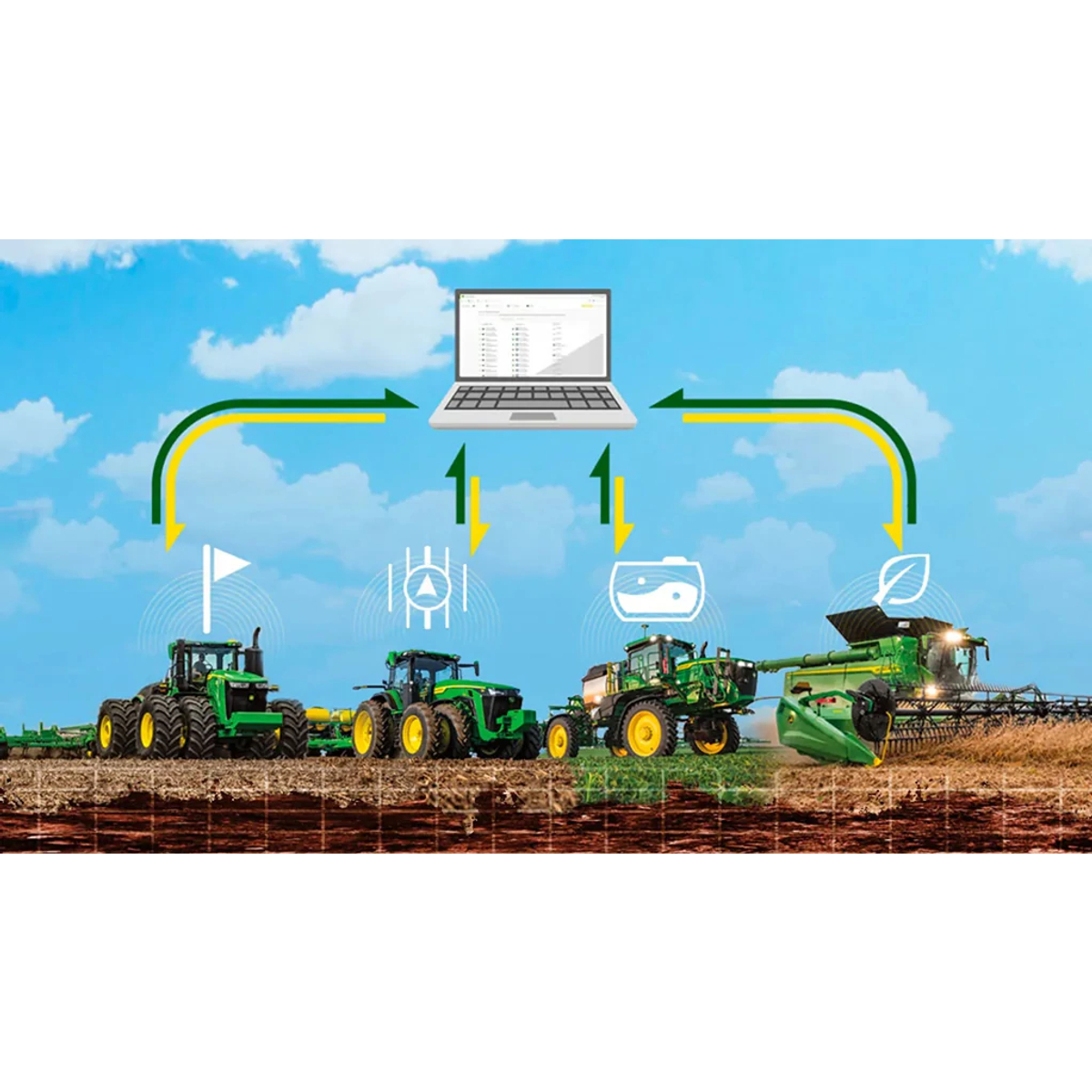
<div class="accordion-wrap"><div class="accordion2_component"><div class="accordion2_top"><div class="text-size-medium text-weight-bold">Save Time and Get to the Field Faster With Data Sync Setup</div><div class="accordion2_icon w-embed"><svg width="100%" height="100%" viewBox="0 0 32 32" fill="none" xmlns="http://www.w3.org/2000/svg"><path d="M25.3333 15.667V16.3336C25.3333 16.7018 25.0349 17.0003 24.6667 17.0003H17V24.667C17 25.0351 16.7015 25.3336 16.3333 25.3336H15.6667C15.2985 25.3336 15 25.0351 15 24.667V17.0003H7.3333C6.96511 17.0003 6.66663 16.7018 6.66663 16.3336V15.667C6.66663 15.2988 6.96511 15.0003 7.3333 15.0003H15V7.33365C15 6.96546 15.2985 6.66699 15.6667 6.66699H16.3333C16.7015 6.66699 17 6.96546 17 7.33365V15.0003H24.6667C25.0349 15.0003 25.3333 15.2988 25.3333 15.667Z" fill="currentColor"></path></svg></div></div><div style="width: 1118px; height: 0px;" class="accordion2_bottom"><div class="margin-bottom margin-small"><div><p>Data Sync Setup eliminates time spent creating and transferring setup files between John Deere Operations Center and the latest John Deere Displays while consistently providing the right setup information where it’s needed, and at the right time. Data Sync Setup shifts your operation from a localized manual data management process to a shared centralized list that updates in near real time as data is created, modified, or removed.</p><img src="https://johndeere.widen.net/content/5fiajqjdjq/png/data-sync-setup-473x354.png" alt="Graphic showing data syncing between various John Deere implements and the John Deere Operations Center" loading="lazy"></div></div></div></div><div class="accordion2_component"><div class="accordion2_top"><div class="text-size-medium text-weight-bold">Access the Right Data, in the Right Place, at the Right Time With Data Sync Setup</div><div class="accordion2_icon w-embed"><svg width="100%" height="100%" viewBox="0 0 32 32" fill="none" xmlns="http://www.w3.org/2000/svg"><path d="M25.3333 15.667V16.3336C25.3333 16.7018 25.0349 17.0003 24.6667 17.0003H17V24.667C17 25.0351 16.7015 25.3336 16.3333 25.3336H15.6667C15.2985 25.3336 15 25.0351 15 24.667V17.0003H7.3333C6.96511 17.0003 6.66663 16.7018 6.66663 16.3336V15.667C6.66663 15.2988 6.96511 15.0003 7.3333 15.0003H15V7.33365C15 6.96546 15.2985 6.66699 15.6667 6.66699H16.3333C16.7015 6.66699 17 6.96546 17 7.33365V15.0003H24.6667C25.0349 15.0003 25.3333 15.2988 25.3333 15.667Z" fill="currentColor"></path></svg></div></div><div style="width: 1118px; height: 0px;" class="accordion2_bottom"><div class="margin-bottom margin-small"><div><p>Access setup data on desired displays without spending time manually creating and sending files between Operations Center and the fleet. Feel confident that the setup information present will enable operators to select from a provided list, alleviating the need for manual entry and potential errors.</p><img src="https://johndeere.widen.net/content/yykmxbwpg8/png/data-sync-status-473x354.png" alt="Data Sync Status screen" loading="lazy"></div></div></div></div><div class="accordion2_component"><div class="accordion2_top"><div class="text-size-medium text-weight-bold">Improve Data Accuracy and Efficiency Through Data Sync Setup</div><div class="accordion2_icon w-embed"><svg width="100%" height="100%" viewBox="0 0 32 32" fill="none" xmlns="http://www.w3.org/2000/svg"><path d="M25.3333 15.667V16.3336C25.3333 16.7018 25.0349 17.0003 24.6667 17.0003H17V24.667C17 25.0351 16.7015 25.3336 16.3333 25.3336H15.6667C15.2985 25.3336 15 25.0351 15 24.667V17.0003H7.3333C6.96511 17.0003 6.66663 16.7018 6.66663 16.3336V15.667C6.66663 15.2988 6.96511 15.0003 7.3333 15.0003H15V7.33365C15 6.96546 15.2985 6.66699 15.6667 6.66699H16.3333C16.7015 6.66699 17 6.96546 17 7.33365V15.0003H24.6667C25.0349 15.0003 25.3333 15.2988 25.3333 15.667Z" fill="currentColor"></path></svg></div></div><div style="width: 1118px; height: 0px;" class="accordion2_bottom"><div class="margin-bottom margin-small"><div><p>Syncing active setup information from John Deere Operations Center to Data Sync Setup-enabled displays removes manual entry that can cause duplicate or incorrect information to be created throughout the season. Increase confidence in work data collected during tillage, application, planting, and harvest by leveraging one common setup list when planning and starting work. This will help ensure that documentation data will be accurate for analysis and remote management.</p><img src="https://johndeere.widen.net/content/8khtnurlrz/png/data-sync-op-ctr-473x354.png" alt="Graphic displaying Data Sync link between enabled displays on various implements and Operations Center" loading="lazy"></div></div></div></div></div>
Question text goes here

Lorem ipsum dolor sit amet, consectetur adipiscing elit. Suspendisse varius enim in eros elementum tristique. Duis cursus, mi quis viverra ornare, eros dolor interdum nulla, ut commodo diam libero vitae erat. Aenean faucibus nibh et justo cursus id rutrum lorem imperdiet. Nunc ut sem vitae risus tristique posuere.

Specifications

<div class="accordion-wrap"></div>